


How to Change the Server Name of a HumanitZ Server

In HumanitZ, your server's name is often the first thing other survivors see before joining your world. A fitting server name helps set expectations and makes your server easier to recognize in the list. Changing it only takes a few moments and is a quick way to give your world its own identity in the middle of the apocalypse.
Follow the steps below to update your HumanitZ server name using the Nodecraft server panel.
How to Change the Server Name
Open your Dashboard.
Locate your HumanitZ server and click the Panel button.
Once on the panel, Stop the server using the button in the upper left corner before making changes.
After the server has stopped, click Game Settings on the left-hand sidebar.
On the Basic tab, locate the Server Name field.
Enter the new name you would like your server to use.
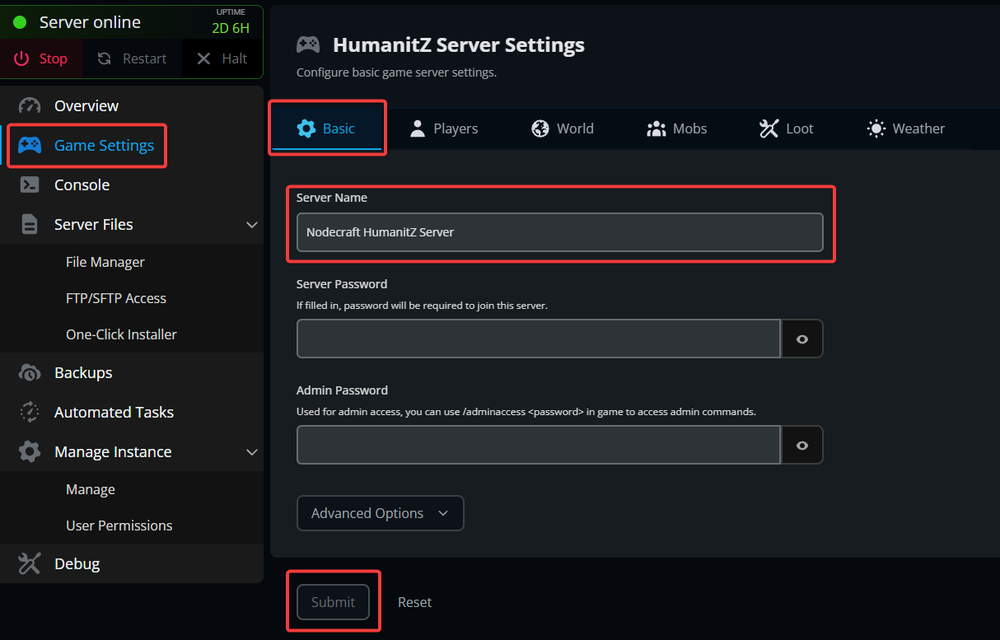
Click Submit at the bottom of the page to save your changes.
Start your server again for the changes to take effect.
Conclusion
That is all it takes to update your server's name. Once the server starts back up, the new name will appear for players joining your world.
Need Help?
If you have questions or run into any issues, our support team is here to help! Reach out using the support widget on our website or visit our support center for further assistance.