


How to Add a Password to Your Hytale Server

This guide will walk you through the process of securing your Hytale server with a password. Adding a password to your Hytale server, similar to enabling the whitelist is a great way to secure your server from uninvited players. Unlike a whitelist you wont need to keep adding players every time you want a new play to join and can simply provide the password. Since this will likely be a shared password, you will want to ensure it's not a normal password that you use anywhere else.
Changing the name
Open your Dashboard.
Locate your Hytale server and click on the Panel button.
Once on your panel, Stop the server using the button in the upper left corner of the panel before proceeding.
Once the server is stopped, click on Game Settings on the left-hand sidebar of the panel.
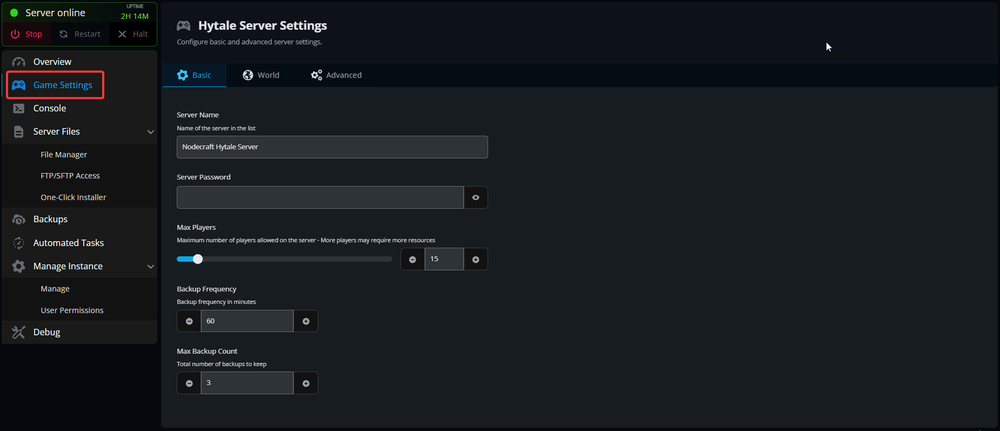
O the Game settings page you will see Server Password.
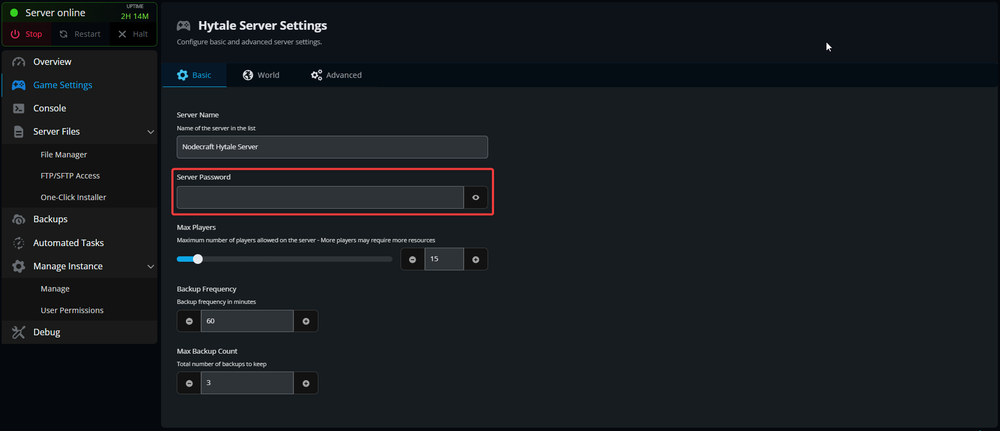
Enter your new desired server password, then scroll down and click the Submit button.
You have now set up a password on your Hytale server. You can change this password any time or remove it to disable the password requirement.
Conclusion
Your server has now been secured using a password. Remember that if you intend to distribute this password to anyone other than yourself that you use a password that is not shared with any other login that you may have.
Need Help?
If you have questions or run into any issues, our support team is here to help! Reach out using the support widget on our website or visit our support center for further assistance.