


How to Change Your Hytale Server Max Backup Count

In this guide we are going to change how many backups your Hytale server will store. By default the server will create and store 5 backups before the oldest backup will automatically be removed. It's worth keeping in mind that backups will count towards your server's overall storage limit.
Changing the frequency
Open your Dashboard.
Locate your Hytale server and click on the Panel button.
Once on your panel, stop the server using the button in the upper left corner of the panel before proceeding.
Once the server is stopped, click on Game Settings on the left-hand sidebar of the panel.
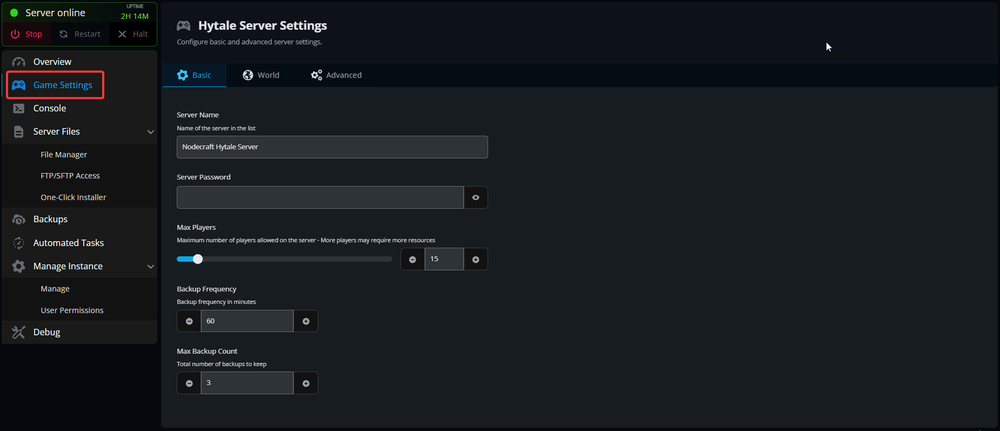
Once on the Game settings page scroll down till you see Max Backup Count.
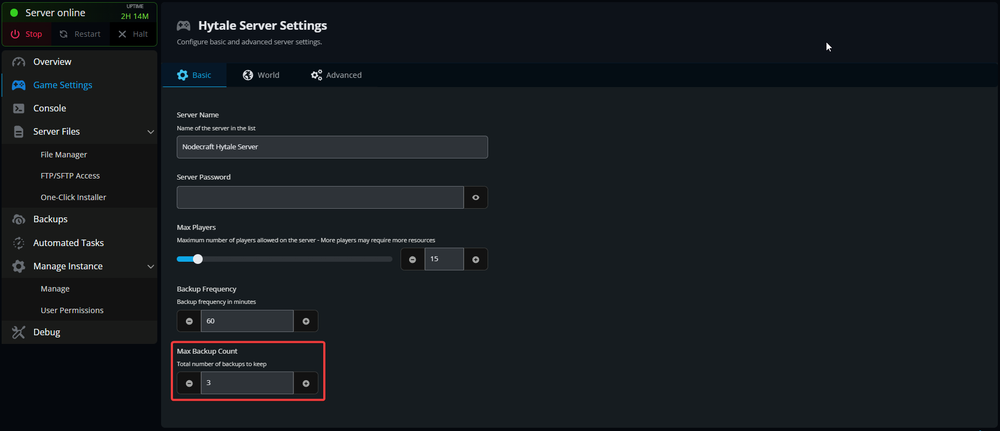
Enter or use the +/- buttons to set a new desired backup count, then scroll down and click the Submit button.
You have now changed how many backups your server will create and save. Once you hit your limit the oldest backup will be removed.
Conclusion
You now have your server storing your desired number of backups. Backups do count to your overall storage limit on your server!
Need Help?
If you have questions or run into any issues, our support team is here to help! Reach out using the support widget on our website or visit our support center for further assistance.