


How to Stop Your Baby Mobs from Aging in Minecraft

With the Minecraft 26.1 “Tiny Takeover” update there has been a rework involving baby mobs. In his guide we are going to go over how you can keep your baby mobs from aging indefinitely using the new Golden Dandelion. This process works on most passive animals but does not work on undead mobs such as baby zombies or baby villagers.
Crafting a Golden Dandelion
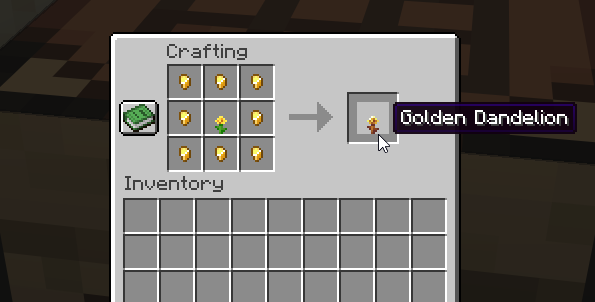
A Golden Dandelion is crafted in a crafting table using 8 gold nuggets and a normal yellow dandelion.
Using a Golden Dandelion on a Baby Mob
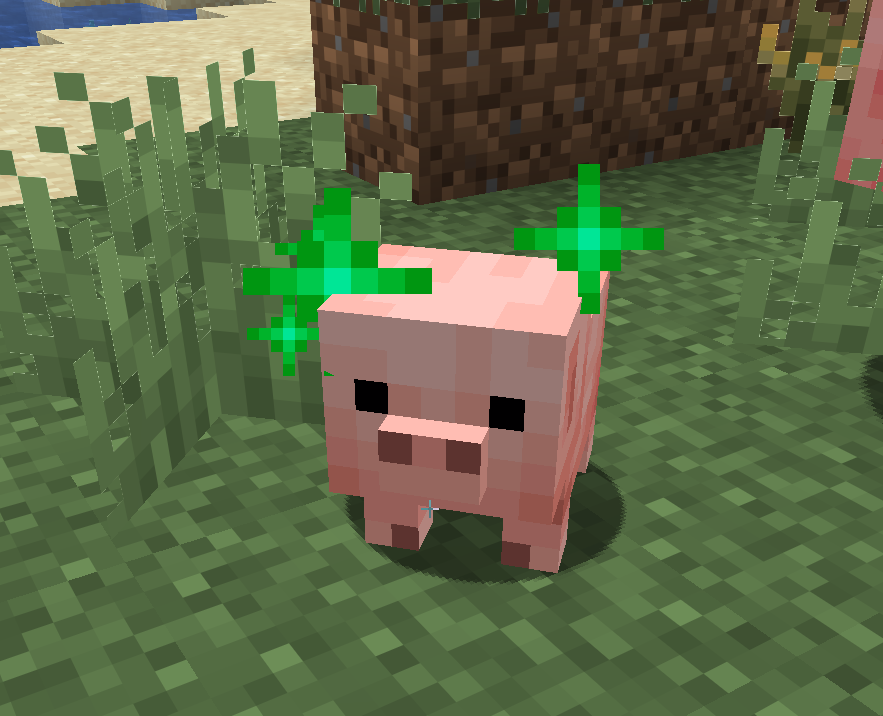
To use the Golden Dandelion all you need to do is approach your baby that you'd like to stop aging on while holding the Golden Dandelion and interacting with it. Interacting is usually done with your right click on your mouse. If successful you should see green particles around your baby.
Conclusion
You have now stopped your baby mob from aging. If you ever want a mob to age up, you can undo it by using another Golden Dandelion. When used again you will see the same green particle effect as you did when stopping aging.
Need Help?
If you have questions or run into any issues, our support team is here to help! Reach out using the support widget on our website or visit our support center for further assistance.