


How to Enable and Disable Friendly Fire on a SCP: Secret Laboratory Server

In this guide we are going to cover how you can enable or disable Friendly Fire on your SCP server. Having friendly fire disabled can help the gameplay of your server and prevent players from ruining the game for others by trying to attack them. On the flip side you can allow friendly fire and players will be able to attack each other!
Note: Always ensure that your SCP: Secret Laboratory server is fully offline before making any config changes or updates!
Enabling Spawn Protection
Open your Dashboard
Locate your SCP server and click on the Panel button.
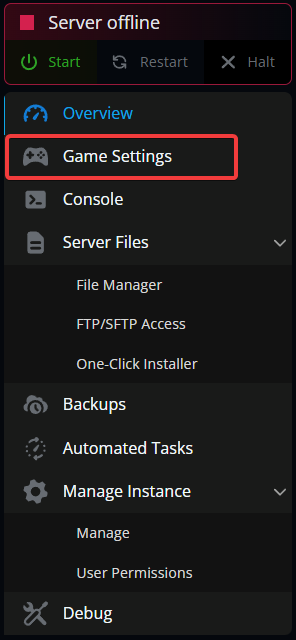
Once on your panel, navigate to your Game Settings.
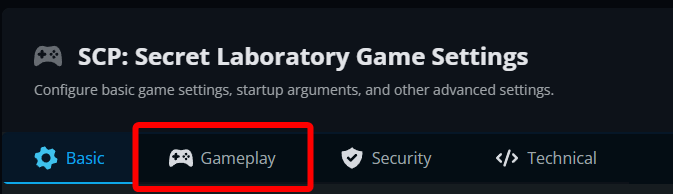
Once on the game settings page, click on the Gameplay tab.
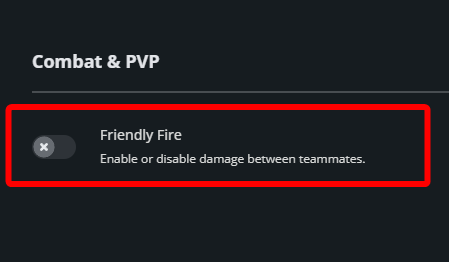
Under Combat & PVP toggle Friendly Fire to on or off.
Click Submit at the bottom of the page then Start your server.
Conclusion
You have now enabled or disabled friendly fire on your SCP server. With it enabled players will not be able to attack other teammates but disabled would allow teammate to teammate combat. This could pose a problem on public servers as other teammates could intentionally attack teammates which could be a form of griefing.
Need Help?
If you have questions or run into any issues, our support team is here to help! Reach out using the support widget on our website or visit our support center for further assistance.