


How to Reset a WukongMP Server

This guide explains how to reset your WukongMP server using the Nodecraft control panel. You can reset the server by deleting the save folder from the File Manager, or by using the One-Click Installer with a fresh install.
Deleting the save folder is usually best if you only want to reset the save data. Using the One-Click Installer with a fresh install is best if you want to fully reinstall the server files.
Note: Be sure your server is fully stopped before deleting files or reinstalling the server.
Reset by Deleting the Save Folder
You can reset your WukongMP save data by deleting the saves folder from the File Manager.
Open your WukongMP server dashboard.
Click Server Files in the left menu.
Click File Manager.
Open the main server folder.
Find the saves folder.
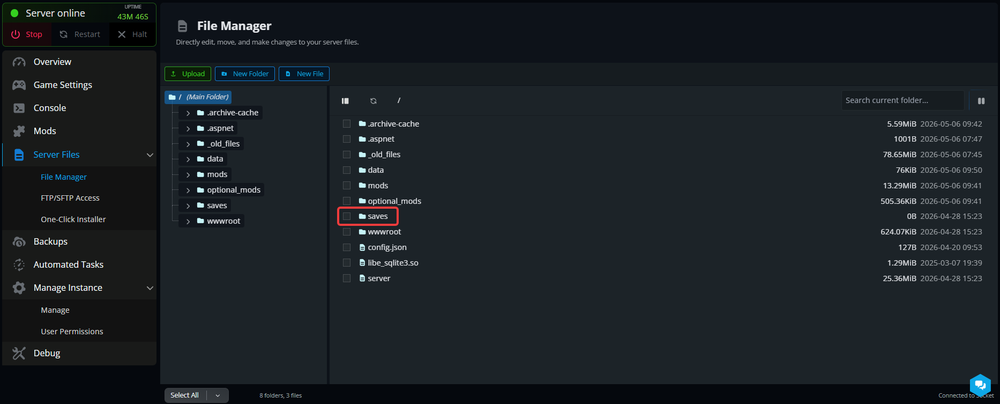
Select the saves folder.
Delete the folder.
Start your server.
When the server starts again, it should generate fresh save data.
Reset with the One-Click Installer
You can also reset the server by reinstalling WukongMP through the One-Click Installer and selecting Fresh Install.
Open your WukongMP server dashboard.
Click Server Files in the left menu.
Click One-Click Installer.
Select WukongMP.
Choose the version you want to install.
Select Fresh Install as the install method.
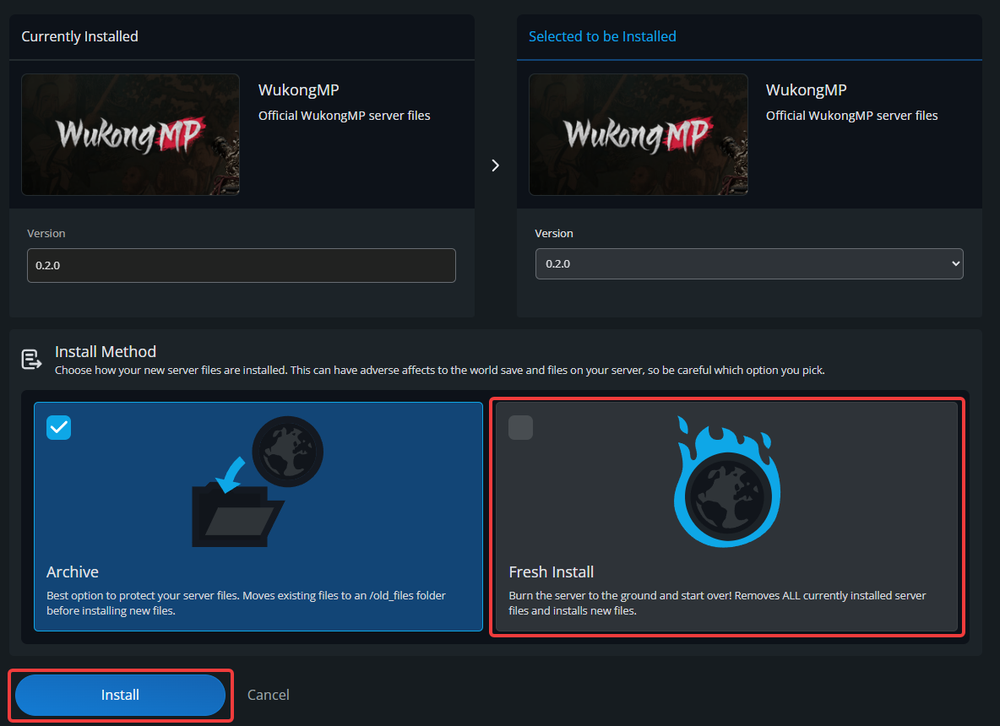
Click Install.
A fresh install removes the currently installed server files and installs a clean copy of WukongMP.
Conclusion
Your WukongMP server has now been reset and is ready for a fresh start. Whether you only cleared the save data or completely reinstalled the server, you can now jump back in with a clean world and new progress. Just try not to immediately make the exact same mistakes all over again.
Need Help?
If you have questions or run into any issues, our support team is here to help! Reach out using the support widget on our website or visit our support center for further assistance.