

How to Toggle Fall Damage on Your Hytale Server

On a Hytale server, fall damage is controlled by a setting in the server control panel. When fall damage is enabled, players take damage from high drops as expected. When it’s disabled, gravity becomes more of a guideline than a strict rule.
Changes to this setting require a server restart to take effect. If you’re adjusting gameplay for building, testing, or just playing, this guide shows where to find the fall damage option and how to toggle it.
Note: Be sure that your Hytale server is fully shut down before making any changes!
⚠️ The Hytale control panel is currently a work in progress. The panel and steps are subject to change as development continues.
Using the Control Panel
Navigate to your Nodecraft Dashboard.
Click on the banner for your Hytale server to open the panel.
Locate and click Game Settings in the menu on the left side.
Under Hytale Server Settings, click the World tab.
Turn off the option for fall damage to disable it or turn it on to enable it.
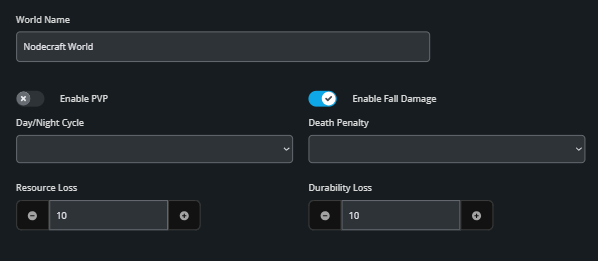
Click the Submit button at the bottom of the page to save your changes.
Start your server.
Need Help?
If you have questions or run into any issues, our support team is here to help! Reach out using the support widget on our website or visit our support center for further assistance.