


How to Set a Password on Your StarRupture Server

Setting a server password in StarRupture puts you in control of who can access your game. A password keeps your server private, protects your progress, and ensures only invited players can join your world.
Setting a Server Password
Open StarRupture.
From the main menu, click Manage Server.

Enter your server’s numerical IP address.
When prompted with the Set Password pop-up, enter your desired server password.

From here, you can choose to start a new game, load an existing save, or update the password if needed.
Note: If you do not set a password, your server will be public!

When you’re ready, click Start Game to set your server with the password enabled.
Reset Your Server Password
Navigate to your StarRupture server control panel in the Nodecraft dashboard.
Stop your StarRupture server.
On the left side, click File Manager.
To reset the manage server password, delete the password.json file. To reset the join password, delete the playerpassword.json file.
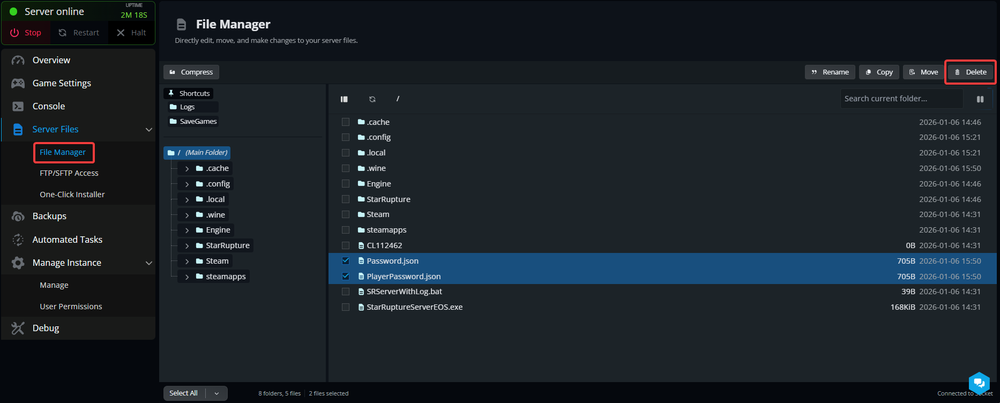
Select the file(s) you'd like to reset.
Click Delete.
Start your server.
If you'd like, you can set another server password using the steps previously.
Conclusion
With a server password set, your StarRupture server is secured and ready to use. You control access to the server and can update or remove the password at any time, keeping your gameplay organized and uninterrupted.
Need Help?
If you have questions or run into any issues, our support team is here to help! Reach out using the support widget on our website or visit our support center for further assistance.