


How to Change the Max Players for Your Hytale Server

In this guide we’ll go over how you can allow more players to join your Hytale server by changing the player limit. Something to keep in mind is that increasing your player limit for your server will not mean the server will be able to handle that number of players. The more players that join the more RAM your server will need. It's important to note that lacking RAM can cause degraded performance and even crashing.
Changing the Player Limit
Open your Dashboard.
Locate your Hytale server and click on the Panel button.
Once on your panel, Stop the server using the button in the upper left corner of the panel before proceeding.
Once the server is stopped, click on Game Settings on the left hand sidebar of the panel.
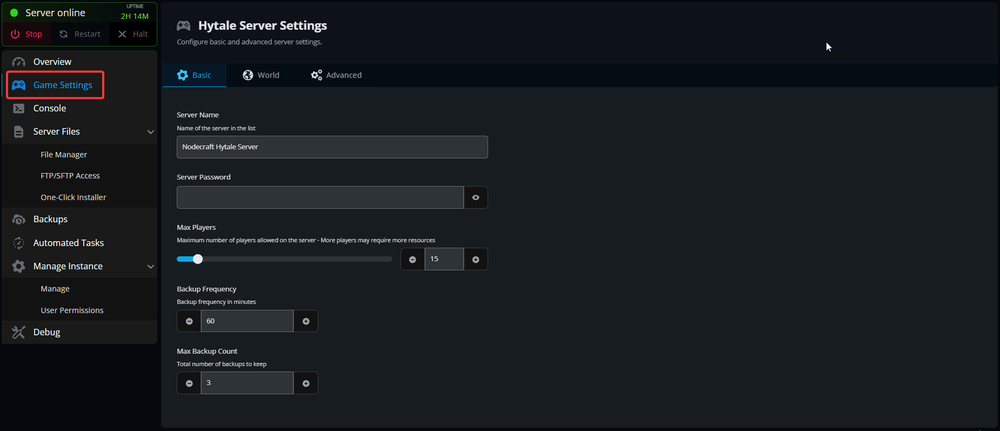
Once on the Game settings page scroll down till you see the Max Players slider.
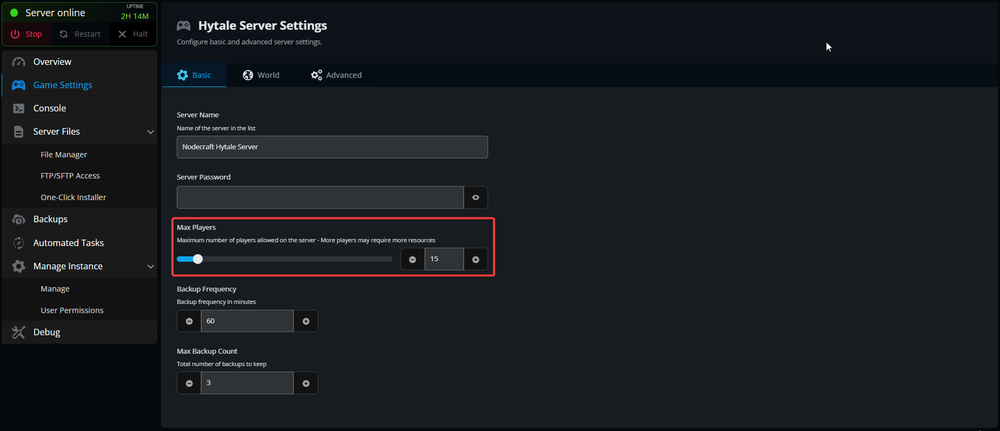
Use the slider to set the limit between 1 and 200 players. Due to a limitation on Hytale 200 players is the current max that any server could see regardless of RAM amount
Scroll down and click Submit.
You have now set your servers Max Players limit!
Conclusion
Your server will now display and allow the new set limit of players. This does not directly increase your server's capability due to the number of players still being closely tied to the amount of free RAM on your server.
Need Help?
If you have questions or run into any issues, our support team is here to help! Reach out using the support widget on our website or visit our support center for further assistance.