


How to Change the Max Players on a HumanitZ Server

In HumanitZ, survival is a lot easier when you have the right number of people watching your back. A larger group can help clear zeek hordes, gather supplies faster, and keep your base safe. Smaller groups can make the experience more tense and survival focused. Adjusting your max player count lets you shape the kind of apocalypse you want to survive in.
This guide will walk you through how to change the maximum number of players allowed on your HumanitZ server using the Nodecraft server panel.
How to Change the Max Players on a HumanitZ Server
Open your Dashboard.
Locate your HumanitZ server and click the Panel button.
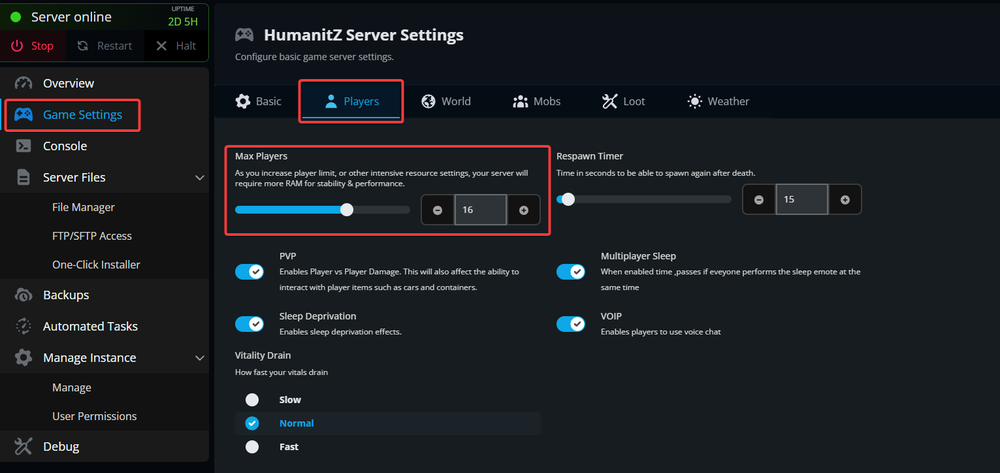
Once on the panel, Stop the server by using the button in the upper left corner before making changes.
After the server has stopped, click Game Settings on the left-hand sidebar.
Open the Players tab.
Locate the Max Players setting.
Enter the number of players you want to allow on your server.
Click Submit at the bottom of the page to save your changes.
Start your server again for the changes to take effect.
Conclusion
That’s all it takes to adjust your server’s player limit. Changing the max player count is a simple way to control how your HumanitZ world feels, whether you are running a small survival group or opening the gates to a larger community fighting to stay alive together.
Need Help?
If you have questions or run into any issues, our support team is here to help! Reach out using the support widget on our website or visit our support center for further assistance.