


Terraria 1.4.5 Bigger & Boulder - Overview

This article highlights the major quality-of-life changes introduced in Terraria, focusing on crafting, reforging, boss feedback, and general usability improvements. These updates are designed to reduce friction and make every day gameplay smoother without changing core balance.
Improved Crafting Interface
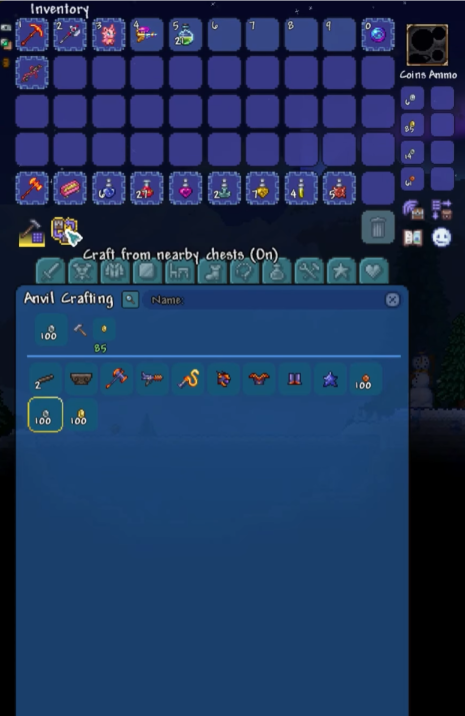
Crafting has been significantly modernized with a new full-screen crafting interface. Instead of scrolling through a long list, players now see all available recipes at once, organized into categories and searchable by name.
Crafting stations such as Anvils and Alchemy Tables automatically open this interface when interacted with. The Guide’s Crafting option also uses the same UI, making it easier to explore recipes and progression paths.
One of the most impactful changes is that crafting can now pull materials from all nearby chests rather than requiring players to open a specific container first.
Reforging Quality Improvements
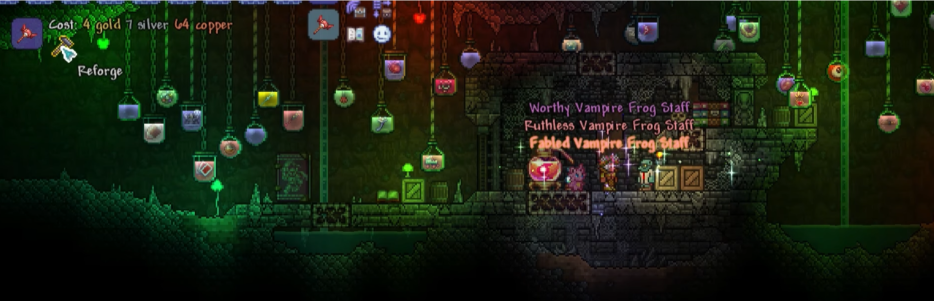
Reforging no longer risks accidentally skipping valuable modifiers. When a top-tier modifier such as Legendary or other best-in-slot modifiers appears, it is highlighted with rainbow text and particle effects. This makes the result immediately noticeable and prevents misclicks.
This change preserves the randomness and cost of reforging while removing one of its most frustrating edge cases.
Boss and Combat Feedback Enhancements
Multiplayer boss fights now provide clearer post-fight feedback. After defeating a boss, players receive a status message showing how long the fight lasted and how much damage each player contributed. This makes group performance easier to understand without third-party tools.
Summoner gameplay also benefits from improved UI clarity. A minion counter is displayed under the active summon buff, showing how many minions are currently summoned at a glance.
World Interaction and Visual Clarity
Several smaller but impactful changes improve how players interact with the world:
Smart Cursor behavior has been improved, especially when placing platforms.
NPC housing checks now visually show which requirements are met or missing.
Critters can be placed as small furniture items and will remain near their placement location.
These changes reduce trial-and-error and make building and decorating more intuitive.

Inventory and Item Usability
Inventory management has been streamlined in several ways:
Earned enemy banners are now claimed from a menu instead of dropping physically, reducing clutter during grinding.
More items, tools, and weapons are stackable.
Tooltips now show key binds for hooks and display inactive armor set bonuses in gray text.
Liquids can also be stored inside bubbles, and item-form pumps no longer burn in lava, preventing accidental losses during wiring or liquid setups.
Summary
These quality-of-life improvements focus on clarity, accessibility, and reduced friction across Terraria’s core systems. Crafting is faster and more flexible, reforging is safer, boss fights provide better feedback and building and inventory management are more intuitive.
While many of these changes are subtle individually, together they significantly improve the overall experience for both new and returning players.
Need Help?
If you have questions or run into any issues, our support team is here to help! Reach out using the support widget on our website or visit our support center for further assistance.